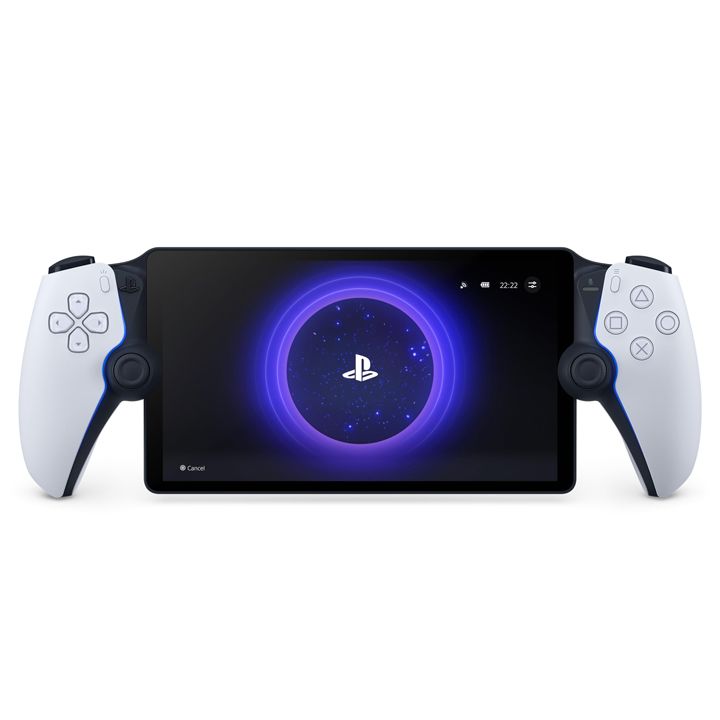
PlayStation Portal Remote Player
$2,500
On Sale
was $2,600 Save $100
In stock: 2 available
1
Save this product for later
Customer reviews
Reviews only from verified customers
No reviews yet. You can buy this product and be the first to leave a review.
Have questions?
PlayStation Portal Remote Player
Product Details
🎮 Sony PlayStation · Remote Play · Nov 2023
Sony PlayStation
PlayStation Portal
Remote Play Device · 8" 1080p LCD · DualSense Controls · PS5 + Cloud Streaming
✅ Stream PS5 Library · PS Plus Premium Cloud Gaming · DualSense Haptics · 1080p@60fps
Your PS5. Anywhere in your home — or anywhere with Wi-Fi. The PlayStation Portal is Sony's dedicated Remote Play device, wrapping a full DualSense controller experience around an 8" 1080p 60Hz screen. Stream your PS5 game library directly. Or cloud stream with PlayStation Plus Premium — no PS5 needed.
|
8"
1080p LCD
60Hz · Touch · VRR
|
1080p
@60fps Stream
25 Mbps HQ mode
|
DualSense
Controller Built-In
Haptics · Adaptive triggers
|
Cloud
Streaming
PS Plus Premium req.
|
📌 What You Need to Know Before Buying
Option 1 — Stream from your PS5: PlayStation Portal streams your PS5 library over Wi-Fi via Remote Play. Requires your PS5 to be on (or in rest mode with remote start enabled) and connected to the internet. Both devices must be on a stable Wi-Fi connection.
Option 2 — Cloud stream (no PS5 needed): As of November 2024, you can cloud stream games directly from PlayStation's servers with a PlayStation Plus Premium subscription. No PS5 required for this mode.
No native game playback: The Portal does not run games locally. It only streams — either from your PS5 or from the cloud.
Option 2 — Cloud stream (no PS5 needed): As of November 2024, you can cloud stream games directly from PlayStation's servers with a PlayStation Plus Premium subscription. No PS5 required for this mode.
No native game playback: The Portal does not run games locally. It only streams — either from your PS5 or from the cloud.
🎮 What You're Getting
| ✓ 8" 1920×1080 LCD · 60Hz · Touch · Variable refresh rate | ✓ Full DualSense controller — haptic feedback · adaptive triggers |
| ✓ Stream PS5 library via Remote Play over Wi-Fi | ✓ Cloud stream games with PS Plus Premium (no PS5 needed) |
| ✓ 1080p@60fps streaming · 25 Mbps High Quality mode | ✓ 3.5mm headphone jack · PlayStation Link audio support |
| ✓ Wi-Fi 5 (802.11ac) · USB-C charging | ✓ All DualSense buttons · Touchpad · Motion sensors · Speaker |
| ✓ Gameplay capture feature (screenshots + video) | ✓ 520g · 356×99×53mm · White |
Overview
Your PS5.
In your hands.
Anywhere with Wi-Fi.
In your hands.
Anywhere with Wi-Fi.
The PlayStation Portal is Sony's dedicated Remote Play device — a full DualSense controller experience built around an 8" 1080p 60Hz touchscreen. Stream your PS5 game library to any room in your house, or take it anywhere with a strong Wi-Fi connection. Since November 2024, it can also cloud stream games via PlayStation Plus Premium — no PS5 required.
"It pretty much nails its primary task. The PlayStation Portal has come a long way since its debut, and Sony's latest updates have turned it into one of the best handheld options available." — GamesRadar+
The design is immediately familiar to any PS5 owner — a DualSense split in two with an 8" screen between them. Every DualSense feature is present: haptic feedback, adaptive triggers, touchpad, all buttons and thumbsticks, motion sensors, speaker, and the Create button. Playing on the Portal feels identical to playing on the PS5 itself — just smaller and over a Wi-Fi stream.
Streaming quality has improved significantly since launch. A March 2025 update raised the maximum bitrate to 25 Mbps in High Quality mode — up from 15 Mbps — delivering visibly sharper, cleaner visuals with fewer compression artefacts in fast-moving scenes. Games like God of War Ragnarök, Cyberpunk 2077, and Spider-Man 2 all look noticeably better in this mode. The screen also supports Variable Refresh Rate (VRR) for smoother motion.
The Portal supports PlayStation Link wireless audio — Sony's proprietary low-latency wireless standard used by Pulse Explore earbuds and Pulse Elite headset (sold separately). A 3.5mm headphone jack is also included for wired audio. An April 2025 update added Gameplay Capture — screenshots and video recording while using Remote Play or Cloud Streaming.
For best results, Sony recommends a stable Wi-Fi connection of at least 15 Mbps — 5GHz Wi-Fi for lowest latency. A wired Ethernet connection for the PS5 (not the Portal) is the most reliable setup for home use. The Portal itself connects via Wi-Fi only — no Ethernet port. Available now at Dream Technologies T&T.
Key Features
The PS5 experience.
Untethered.
Untethered.
|
🎮
Full DualSense · Haptics · Adaptive Triggers
Every DualSense feature, built in. Haptic feedback recreates in-game sensations — rain, surface textures, impact. Adaptive triggers provide physical resistance matching in-game tension — bow strings, car acceleration, weapon recoil. Touchpad, all buttons, thumbsticks, motion sensors, Create button, and speaker — all present. Playing on the Portal feels identical to your PS5 controller.
|
📺
1080p@60fps · 25 Mbps HQ Mode · VRR
8" 1920×1080 LCD at 60fps — sharp, responsive, and smooth for PS5 gaming. March 2025 update raised maximum bitrate to 25 Mbps in High Quality mode — significantly sharper visuals with fewer compression artefacts than at launch. Variable Refresh Rate (VRR) for smoother motion. Touch-enabled for PS5 games that use touchscreen.
|
|
☁️
Cloud Streaming · No PS5 Required · PS Plus Premium
November 2024 update added cloud game streaming — stream PlayStation games directly from Sony's servers without your PS5 being on. Requires a PlayStation Plus Premium subscription. Gives the Portal an independent identity beyond just a PS5 companion — useful when away from home or when your PS5 is being used by someone else.
|
🔊
PlayStation Link · 3.5mm · Gameplay Capture
PlayStation Link wireless audio — Sony's proprietary low-latency audio standard for Pulse Explore earbuds and Pulse Elite headset (sold separately). 3.5mm headphone jack for wired audio without adapters. April 2025 update added Gameplay Capture — take screenshots and record video clips while streaming.
|
|
💡
Best Setup Tips
For best performance: Connect your PS5 to your router via Ethernet (wired) — not Wi-Fi. The Portal itself connects wirelessly. Use 5GHz Wi-Fi on the Portal for lowest latency. Sony recommends at least 15 Mbps for smooth 1080p streaming. Enable rest mode with remote start on your PS5 so it wakes up when the Portal connects. Avoid streaming over congested public Wi-Fi.
|
👤
Who This Is For
PS5 owners who want to play in bed, another room, or on a trip. Households where the TV is occupied — kids, partners, flatmates. PS Plus Premium subscribers who want a dedicated cloud gaming device. Anyone who wants a premium, purpose-built PlayStation Remote Play experience rather than using a phone clip-on solution.
|
Full Specifications
Every detail.
Specifications
| Display | 8.0" LCD · 1920×1080 · 60Hz · VRR · Touch 1080p |
| Streaming Quality | Up to 1080p@60fps · Up to 25 Mbps (High Quality mode) |
| Controller | Full DualSense — haptic feedback · adaptive triggers · touchpad · all buttons · motion sensors · speaker |
| Remote Play | Stream from PS5 via Wi-Fi · PS5 must be on or in rest mode with remote start |
| Cloud Streaming | Yes — PlayStation Plus Premium subscription required Cloud Gaming |
| Native Game Playback | No — streaming only (Remote Play or cloud) |
| Connectivity | Wi-Fi 5 (802.11ac) · 2.4GHz + 5GHz · No Ethernet port |
| Audio | 3.5mm headphone jack · PlayStation Link wireless audio (Pulse earbuds/headset) · Built-in speaker |
| Charging | USB-C USB-C |
| Capture | Screenshots + video recording (April 2025 update) |
| Dimensions | 356 × 99 × 53mm |
| Weight | 520g |
| OS | Android (PlayStation-optimised) |
| Recommended Speed | Minimum 15 Mbps · 5GHz Wi-Fi recommended · Wired Ethernet for PS5 ideal |
| Colour | White |
| In the Box | PlayStation Portal device · USB-C cable |
| Condition | Brand New · Factory Sealed New |
Display prices in:TTD